Articles: Fix for Firefox Stuck at "transferring data from" Hanging/Slowness Problem
Posted by: david on 12/04/2012 - 12:55 PM
Lately I've been plagued here and there with Firefox being stuck/hanging- being just plain unresponsive and having to kill it (firefox.exe and plugin-container.exe) via the Task Manager. I am running Windows 8 x64, but I've also remember it having the slowness issue occasionally as well. I would go to a page and Firefox would get stuck and say "transferring data from name_of_the_site...". A lot of time it would be a site what is running Google ads or loading data from some content network.
The page would eventually finish loading if I wait over a minute (I'm running a Core i7-3770, BTW). But then Firefox would become stuck again- I can't click on the other tabs nor interact with any links on the page that finally finished loading. It's very frustrating. I KNOW that this is a Firefox issue because when immediately I load the same problem sites with Chrome or IE or Opera, they come up quickly without a hitch. It's also not like I'm running some old version of Firefox- I'm using Firefox 17.0.1.
The weird thing is that upon restarting Windows, Firefox would no longer have the problem. But I certainly don't want to restart windows everytime this happens. And this has happened enough to the point where I thought about abandoning Firefox, but I love the Awesome Bar and it's been my #1 browser for 7 or 8 years now, so I wanted to really get to the bottom this problem. So I started to poke around in the Add-ons Manager and disabled all of the Extensions. It did not work as the same problem persists.
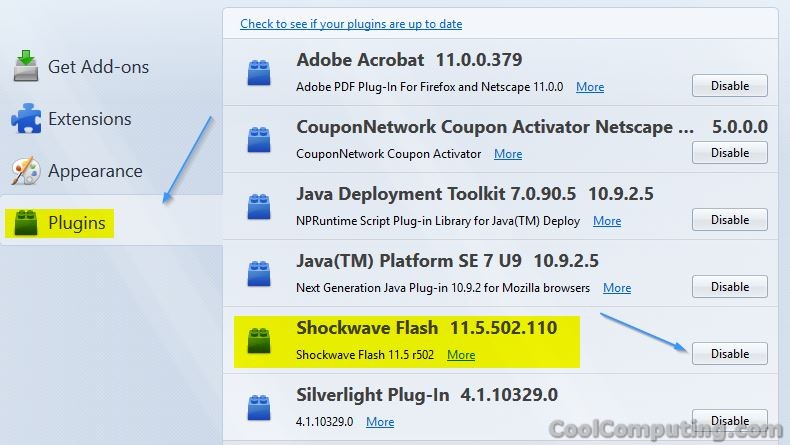
But then I went to the Plugins section and noticed that after I disabled Shockwave Flash, Firefox no longer had the problem. It became lightning FAST. The version of of the Adobe Flash plugin was 11.5.502.110.
I'm not sure if this is a bug introduced by Adobe or Mozilla, but for now this fix/workaround will do for me. If I need to use a site with Flash, I'll use Google Chrome or Internet Explorer from this point forward.
The page would eventually finish loading if I wait over a minute (I'm running a Core i7-3770, BTW). But then Firefox would become stuck again- I can't click on the other tabs nor interact with any links on the page that finally finished loading. It's very frustrating. I KNOW that this is a Firefox issue because when immediately I load the same problem sites with Chrome or IE or Opera, they come up quickly without a hitch. It's also not like I'm running some old version of Firefox- I'm using Firefox 17.0.1.
The weird thing is that upon restarting Windows, Firefox would no longer have the problem. But I certainly don't want to restart windows everytime this happens. And this has happened enough to the point where I thought about abandoning Firefox, but I love the Awesome Bar and it's been my #1 browser for 7 or 8 years now, so I wanted to really get to the bottom this problem. So I started to poke around in the Add-ons Manager and disabled all of the Extensions. It did not work as the same problem persists.
But then I went to the Plugins section and noticed that after I disabled Shockwave Flash, Firefox no longer had the problem. It became lightning FAST. The version of of the Adobe Flash plugin was 11.5.502.110.
I'm not sure if this is a bug introduced by Adobe or Mozilla, but for now this fix/workaround will do for me. If I need to use a site with Flash, I'll use Google Chrome or Internet Explorer from this point forward.