Tips: Windows-world


See all

Articles: Fix for Canon MX922 Google Cloud Print Problem
Posted by: david on Monday/March 14/2016 - 02:27 AM
Windows Tips
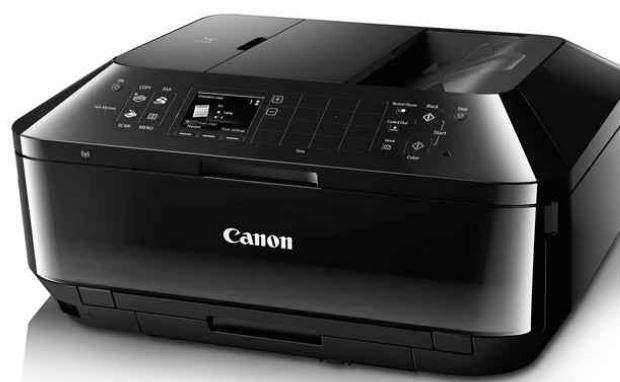
The Canon Pixma MX922 Multifunction printer does it all- print, copy, scan and fax. It even does Google Cloud Print (GCP), which to-date is the only way to print from a Chromebook. We had gifted both to a relateve (Steve), but unfortunately he could not the Chromebook to print. Steve even bought a USB cable, but obviously he didn't know about the severely limited printing functionality for Chrome OS systems. So when we visited Steve recently, I decided to try and get the Asucks Chromebook. Ooops I meant ASUS- a slip of the tongue, stemming the extremely....

Read the Entire Article 2 Reviews/Comments
Windows Context Menu Image Edit Change Default to Picasa

Posted by: david on Friday/February 27/2015 - 03:57 PM
Windows Tips


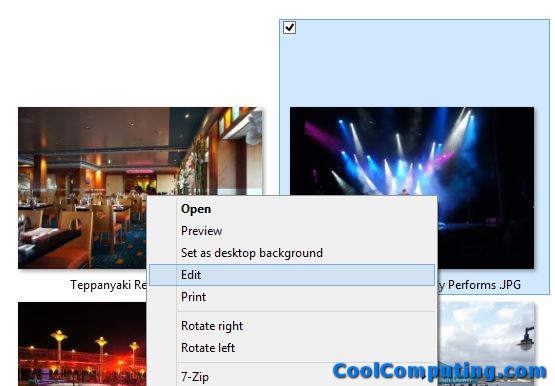
Lately I have been using Google's Picasa 3.9 quite a bit to edit/enhance photos, add captions, and other functions on my Windows 8.1 PC. But the thing is, in order to work on a specific picture file (e.g. with the .jpg extension) in the editor, I have to double-click on it, which opens it in Picasa Photo Viewer, then right-click and pick Edit.

If I right-click on an image file in Explorer, I see that in the Context Menu that there is an Edit option/function. But selecting it always opened the file in....


Articles: American Express & Bank of America Export to OFX for Microsoft Money/MS Office Accounting

Posted by: david on Thursday/January 08/2015 - 08:24 PM
Windows Tips
It is the start of the year, and tax season is here, so I was wanting to download transactions from various financial institutions such as credit card companies into my accounting software. I still use the now-defunct Microsoft Office Accounting software, which requires import to be of in OFX format. That is the same format that Microsoft Money (which has also been axed by MS) uses. The card companies I use mostly still allow the export of transaction data into OFX, but when I logged into American Express today, I did not readily see such an option.

Read the Entire Article 3 Reviews/Comments

Edit Read-Only PDFs for Free

Posted by: david on Wednesday/August 20/2014 - 02:31 PM
Windows Tips
I wanted to edit a PDF file which was an order form that came via email. I didn't, however, want to bother with printing out the form, then scanning and then emailing it back. I don't have Adobe Acrobat Pro, so I looked around for a free solution. Besides, digitally filling out the PDF looked more professional and legible. I saw some free online-only, "cloud" based solutions where you can upload the PDF and then edit it over the web, but this particular order form needed my credit card number and other personal info, so I didn't feel....

Articles: Fix & Troubleshoot Windows Explorer Crashing

Posted by: david on Friday/April 18/2014 - 01:08 PM
Windows Tips
After rebooting my Windows 8.1 PC today, I tried to access my files through the "This PC" icon on the desktop, which basically loads Windows Explorer and shows an all-drives view. But every time I do so, the desktop would do a "flash" effect (all desktop icons disappearing for a moment, then returning) and no Explorer window appeared. I tried under Task Manager to End Task, then Run "Explorer.exe" again, but to no avail.

It was time to check the Event Viewer logs. I checked under "Windows Log", then System, but didn't see anything. ....


Articles: Script to Auto Unmount/Remove Mapped Network Drives in Windows 8.1

Posted by: david on Friday/February 14/2014 - 02:39 PM
Windows Tips
I use a backup software (Synology Data Replicator) on my Windows 8.1 PC that creates a pair of mapped network drives when it begins backing up to my network attached storage (NAS). Unfortunately those mounted drives persist after the NAS shuts down, and when I save files in various different programs using "Save As", there would be lot of "hang time", even up to half a minute, before I can actually save the file. The reason is because Windows is somehow querying those networked mappings and the operation was timing out. I confirmed this because once I....

Articles: Solution to Windows XP Slow Boot/Black Screen After Logging In

Posted by: david on Tuesday/January 14/2014 - 06:12 PM
Windows Tips
I have a Windows XP running in a virtual machine via VMWare Player. It used to boot up quite quickly, but for the last couple of months it could get dog-gone slow. Getting to the initial user log-in screen was quick, but after entering the password, it would be literally 5 minutes later before desktop would load. During this time, it would just show a black screen. If I run Task Manager, it shows that System Idle Process as at 99% or 98% most of the time. So it didn't seem to be anything holding....

Articles: Windows Defender MsMpEng.exe High CPU Access Denied Fix

Posted by: david on Monday/November 18/2013 - 01:30 AM
Windows Tips
I was working on my Windows 8.1 PC, doing nothing unusual, but noticed the CPU fan is on full blast and loud. I launched Task Manager and noticed that the CPU usage is at 56%, which is really high considering I'm using a quad core i7 CPU with hyper threading on (for a total of 8 virtual cores). It's pretty much taking up 100% of one of the cores. It turned out that the culprit was MsMpEng.exe, which is the Windows 8 built-in Windows Defender Service anti-virus software (running as Antimalware Service Executable) by Microsoft.


Read the Entire Article 1 Review/Comment

Automatically Delete Old Files in a Folder in Windows

Posted by: david on Wednesday/September 18/2013 - 03:50 PM
Windows Tips
I have a Foscam FI8910W camera that we setup as a baby monitor. I have the IP Cam automatically upload captured images whenever there is motion, via FTP, to my Windows 8 PC running Filezilla FTP Server. It's a nice setup, except I end up with tens of thousands of old screen .jpg captures in my ftp folder (which I have located at "D:\foscam") that I have to manually delete. So I wonder, can I have Windows automatically delete files in this folder that are older than, let's say 3 days? This is because even though....

Articles: Windows Media Center View Video Feed/Resolution Info| Windowed Mode Stuck at 540p

Posted by: david on Thursday/April 11/2013 - 11:17 PM
Windows Tips
I've been running Windows Media Center (WMC) for Windows 7 and now Windows 8 Pro for a while now, and it has bothered me that the video quality seemed to be much lower when you view in a window. Even if you have WMC running in a window just a tiny bit smaller than full screen, you can see jaggies everywhere despite viewing 1080p or 1080i content.

Some background information- I'm using a Time Warner CableCARD with a Cisco STA1520 Tuning Adapter, and watching on the Dell U2713HM 27" monitor via Dual DVI-D connection. BTW- I....


Articles: OpenOffice/LibreOffice Custom Hot Keys to Add New Row & Highlight Cells

Posted by: david on Thursday/March 28/2013 - 03:01 PM
Windows Tips
I use OpenOffice Calc on a daily basis. I know that LibreOffice is supposedly better, etc, but the one time I tried it I had issues with it messing up the quotes when I tried to export to a tab-delimited file. Plus Open Office has more life in it has now it is "owned" by Apache, which is a trusted long time provider of the Apache web server.

Anyways I wanted to share a tip that will help you work faster in OpenOffice Calc which should also apply to LibreOffice since they were based on....


Read the Entire Article 1 Review/Comment

Articles: Multi-Monitor with Intel HD4000 and Discreet Graphics Card (AMD Radeon) in Windows

Posted by: david on Wednesday/March 13/2013 - 08:50 PM
Windows Tips
So after the debacle of trying to hook up an old 15 inch LCD VGA monitor to my ATI/AMD Radeon HD 6950 using the DVI-D connector and have it work simultaneously with my new Dell U2713HM 2560x1400 monitor, I had to look for another solution. I did not want to spend more money on an extra active adapter to make the VGA monitor work with my new Windows 8 Core i7-3770 PC. But then I thought- duh- why don't I just plug in the VGA monitor directly to the VGA connector available directly on the motherboard....

Articles: Windows Media Center Display Driver Error on Dell U2713HM Using DisplayPort + DVI Adventure

Posted by: david on Wednesday/March 06/2013 - 09:43 PM
Windows Tips
I got my brand spanking new Dell 2713HM today- wanted it for its 2560x1440 resolution and of course excellent reviews abound. I read that it did NOT include a DisplayPort cable, so I ordered one from Amazon for $9. This, turned out to be a waste of money as you will see. I was under some dumb notion that if I wanted to do 2560x1440 on this 27" beast of a monitor, I needed dual DVI cables, which I thought I was too messy. That's why I bought the DisplayPort cable which supports 2560/1440p, unlike single....

Articles: Mass Change Date Taken for Multiple Files in Windows for Photos

Posted by: david on Tuesday/March 05/2013 - 05:49 PM
Windows Tips
I was going through some vacation photos lately and noticed pictures taken for a particular camera had invalid dates. The camera in question was the Kodak Playsport ZX3 waterproof video camera which loses its setting whenever I opened its battery compartment take out the SD card. So the photos taken with the camera had a bad date of January 6 2010 instead of the correct dates of February 18 2013.

There were about 30 photos I wanted to change the "Date Taken" value for, so I did not want to do it one at a time. ....


Articles: Thunderbird View Only Important Emails

Posted by: david on Sunday/February 24/2013 - 11:47 AM
Windows Tips
If you are a Mozilla Thunderbird user and were on vacation and you didn't want to/or had a chance to check your email during your break, you'd like to see right away the most important emails you missed once you got back.

I have several Message Filter rules set up that look for specific words in subjects in incoming emails, and also check if the messages are from people in my contact list. Then the rule will set them to Highest Priority and the message is tagged Important. If you have something like that setup,....


Articles: Fixed - Logitech Gaming Software 8.40.83 Runtime Error

Posted by: david on Wednesday/February 06/2013 - 05:21 PM
Windows Tips
I have the Logitech Gaming Software 8.40.83 64-bit installed on my new Windows 8 i7-3770 PC. It is needed to operate my Logitech G11 Gaming Keyboard, as well as the G13 keypad and the G930 Headset I had gotten a few months ago. The other night I decided to restart my PC after Windows Update needed a reboot. So I'm sitting there looking at the BiOS start screen, so I thought heck why not take a look to see if there is any new update for the Asrock Z77 Pro4 motherboard? Turned out that there....

Articles: Windows Media Center Slow Motion

Posted by: david on Saturday/January 26/2013 - 04:24 PM
Windows Tips
Earlier this morning I was watching the 2013 Australian Open Women's Finals match on my Windows 8 Media Center PC. Too bad Li Na lost! But I was looking at the technique of these great players hitting forehands and backhands. I wanted to see how they moved their feet as they struck the ball, but even though I could pause and go back to examine specific movements, I didn't know how to have Windows Media Center do slow motion forward.

I played around with the controls, and it turns out that you can do this by....


Articles: Windows 8 Folder Hang Workaround - Script to Automatically Kill and Reload Windows Program

Posted by: david on Thursday/December 20/2012 - 05:48 PM
Windows Tips
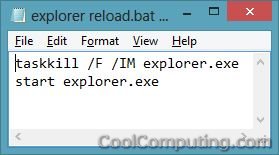
Lately I've been having some issues with a folder on my Windows 8 PC. For work purposes, I always keep the folder open and some screen shots in it. Unfortunately, after a while, when I switch back to the open folder, it just hangs and I have to run Task Manager and manually kill all instances of explorer.exe, then run explorer.exe again to get rid of the stuck folder window and restore my desktop. After the latest batch of Windows 8 updates, I still don't see the problem fixed. Now it....

Articles: Fix for Firefox Stuck at "transferring data from" Hanging/Slowness Problem

Posted by: david on Tuesday/December 04/2012 - 12:55 PM
Windows Tips
Lately I've been plagued here and there with Firefox being stuck/hanging- being just plain unresponsive and having to kill it (firefox.exe and plugin-container.exe) via the Task Manager. I am running Windows 8 x64, but I've also remember it having the slowness issue occasionally as well. I would go to a page and Firefox would get stuck and say "transferring data from name_of_the_site...". A lot of time it would be a site what is running Google ads or loading data from some content network.

The page would eventually finish loading if I wait over a....


Fix for Cannot Connect to Windows Media Center from Xbox 360/Media Center Extender

Posted by: david on Thursday/November 29/2012 - 01:31 PM
Windows Tips
I've been having a few issues lately with my new Windows 8 PC, much of it having to do with the 10 gig Dataram RAM Disk I created. The drive would stop responding occasionally when it does its AutoSave, and cause the computer to be unresponsive to the point that I have to hit the reset button. But anyways, I think these hard resets have messed up my system a bit, and then my Xbox 360 could no longer find/connect to Windows Media Center running on the PC.

The first time the XBOX, acting as the Media....