Articles: American Express & Bank of America Export to OFX for Microsoft Money/MS Office Accounting
Posted by: david on 01/08/2015 - 08:24 PM
It is the start of the year, and tax season is here, so I was wanting to download transactions from various financial institutions such as credit card companies into my accounting software. I still use the now-defunct Microsoft Office Accounting software, which requires import to be of in OFX format. That is the same format that Microsoft Money (which has also been axed by MS) uses. The card companies I use mostly still allow the export of transaction data into OFX, but when I logged into American Express today, I did not readily see such an option.
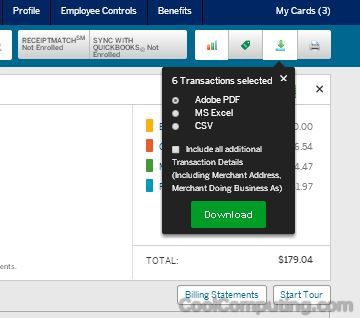
Last year I remember that I was able to import American Express transactions by downloading into Quicken/Quickbooks format of QFX, and then renaming the file extension to OFX. This time, however, I see that there is a new option called Sync with Quickbooks, and when I went to the Download Transactions option, it only showed 3 options:
I tried some of the CSV to OFX converters out there, but nothing really worked for me, so I went back to AmericanExpress.com and played around some more there. Apparently, if you:
Hope this helps anyone still using MS Money or Office Accounting Professional and are upset at AMEX for removing the feature. The capability is still there, thankfully. You just have to pick the right options and then rename.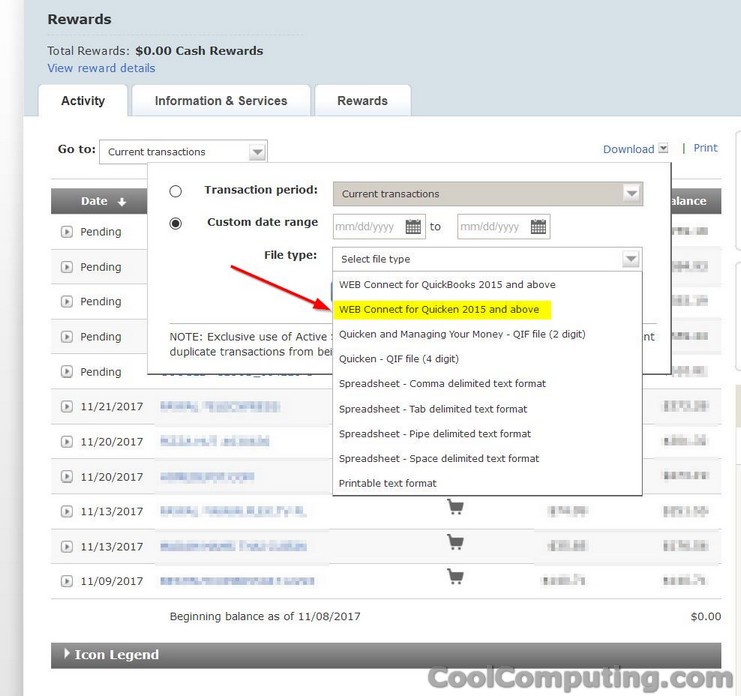
Last year I remember that I was able to import American Express transactions by downloading into Quicken/Quickbooks format of QFX, and then renaming the file extension to OFX. This time, however, I see that there is a new option called Sync with Quickbooks, and when I went to the Download Transactions option, it only showed 3 options:
- Adobe PDF
- MS Excel
- CSV
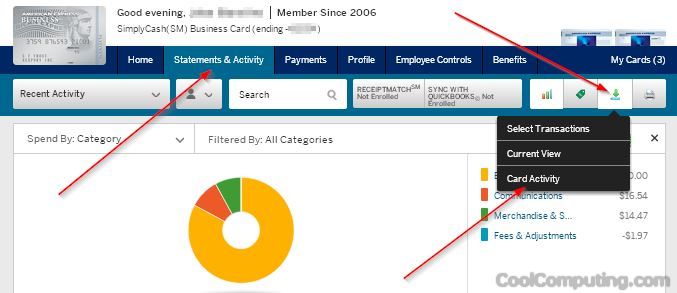
I tried some of the CSV to OFX converters out there, but nothing really worked for me, so I went back to AmericanExpress.com and played around some more there. Apparently, if you:
- Go to Statements & Activity
- Click the download transactions icon
- Instead of clicking "Select Transactions", pick "Card Activity"
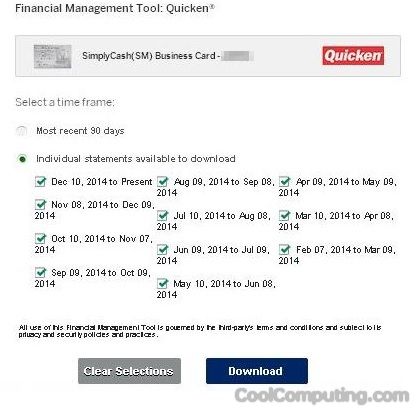
- You will be brought the the same old export to Quicken option from last year
- Pick your statements- I just go ahead and select all of them from the past 12 months, then click the Download button at the bottom
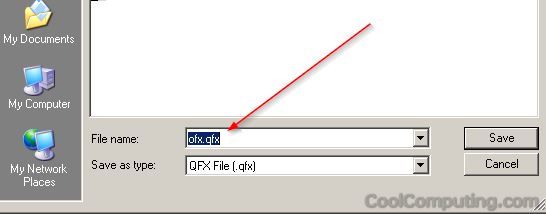
- Save the QFX file (which interestingly is called ofx.qfx by default), then rename the extension to
QFXOFX (thanks to JB for pointing out the typo), so that it ends up named ofx.ofx and you are good to go again.
Hope this helps anyone still using MS Money or Office Accounting Professional and are upset at AMEX for removing the feature. The capability is still there, thankfully. You just have to pick the right options and then rename.
Addendum November 2017
I recently opened a business credit card account (Business Advantage Cash Rewards) with Bank of America, and encountered a similar issue. But thankfully the solution is very similar. You would:
- Go to to Activity tab
- Click the Download link (to the left of Print)
- Pick your Transaction period range. Nice thing here is that you can download a year's worth instead of just 3 month at a time like some other banks (cough cough American Express & Capital One)
- For File type, pick WEB Connect for Quicken 2015 and above, not Quickbooks
- Rename the extension of the stmt.qfx file to ofx (e.g. so that it ends up to be stmt.ofx). Import, and you're good to go!
See the screenshot below: