Articles: Solution to Windows XP Slow Boot/Black Screen After Logging In
Posted by: david on 01/14/2014 - 06:12 PM
I have a Windows XP running in a virtual machine via VMWare Player. It used to boot up quite quickly, but for the last couple of months it could get dog-gone slow. Getting to the initial user log-in screen was quick, but after entering the password, it would be literally 5 minutes later before desktop would load. During this time, it would just show a black screen. If I run Task Manager, it shows that System Idle Process as at 99% or 98% most of the time. So it didn't seem to be anything holding it up, though there were a few curious svchost.exe entries running.
I finally got tired of the problem, and wanted to further investigate. I tried running explorer.exe and nothing happened. I killed some tasks, and it seemed to make it worse as an hourglass icon would appear, and then nothing would load, even after the usual 5 minutes, requiring a hard re-boot.
So I looked in the Event Viewer (under Administrator Tools in Control Panel), then went to System to view the OS-related entries. I noticed that after an entry for "Service Control Manager" with the description of "The Terminal Services service entered the running state", there was a two minute lag before the next entry. That one had the description of "The Fast User Switching Compatibility service was successfully sent a start control."
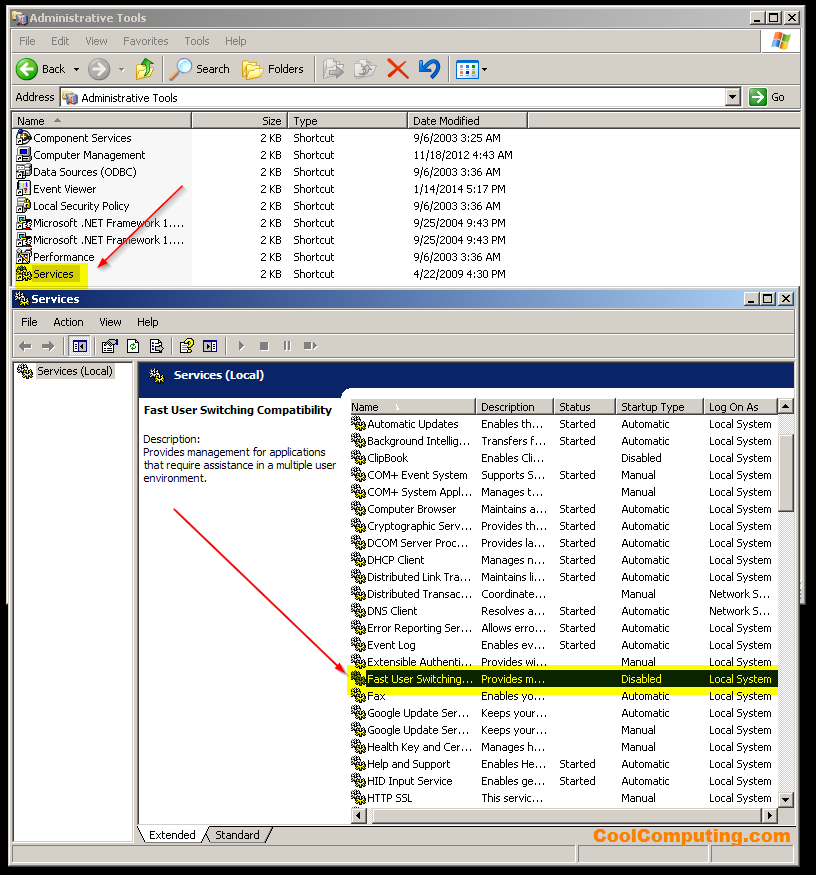
Figuring that I found the culprit, I went to Services (again under Admin Tools), and set the service Fast User Switching to Disabled from Manual in the properties for Startup Type. I then did a restart, and this time it only took 6 seconds or so after entering the password to get to the desktop.
What a difference that made. LOL- I find it ironic that a service with the word "Fast" in it was responsible for terribly slowing down the boot up speed of the OS. I imagine that disabling this service may affect the speed of switching users under XP, but it doesn't apply to me and I think it is the same case for most users out there still using Windows XP for compatibility purposes as well.
I finally got tired of the problem, and wanted to further investigate. I tried running explorer.exe and nothing happened. I killed some tasks, and it seemed to make it worse as an hourglass icon would appear, and then nothing would load, even after the usual 5 minutes, requiring a hard re-boot.
So I looked in the Event Viewer (under Administrator Tools in Control Panel), then went to System to view the OS-related entries. I noticed that after an entry for "Service Control Manager" with the description of "The Terminal Services service entered the running state", there was a two minute lag before the next entry. That one had the description of "The Fast User Switching Compatibility service was successfully sent a start control."
Figuring that I found the culprit, I went to Services (again under Admin Tools), and set the service Fast User Switching to Disabled from Manual in the properties for Startup Type. I then did a restart, and this time it only took 6 seconds or so after entering the password to get to the desktop.
What a difference that made. LOL- I find it ironic that a service with the word "Fast" in it was responsible for terribly slowing down the boot up speed of the OS. I imagine that disabling this service may affect the speed of switching users under XP, but it doesn't apply to me and I think it is the same case for most users out there still using Windows XP for compatibility purposes as well.