Windows Context Menu Image Edit Change Default to Picasa
Posted by: david on 02/27/2015 - 03:57 PM
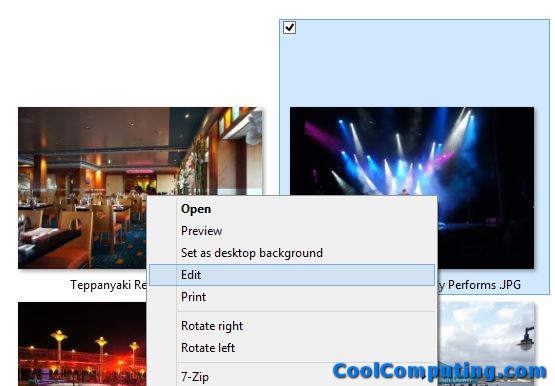
Lately I have been using Google's Picasa 3.9 quite a bit to edit/enhance photos, add captions, and other functions on my Windows 8.1 PC. But the thing is, in order to work on a specific picture file (e.g. with the .jpg extension) in the editor, I have to double-click on it, which opens it in Picasa Photo Viewer, then right-click and pick Edit.
If I right-click on an image file in Explorer, I see that in the Context Menu that there is an Edit option/function. But selecting it always opened the file in Paint (mspaint.exe), which is the default Windows elementary graphics editor (you can't even call it a photo editor). I also took a look and noticed on my Windows XP virtual machine, it has the same behavior by default.
All it takes, however, to fix this Photo Editor file association issue is a simple edit in the registry.
- Click Windows Start button, Pick Run (or if you are not using classic Start Menu tool, simply press the [Windows key] + R
- Type in "regedit" without the quotes
- The User Account Control (UAC) prompt may appear- click Yes
- Navigate to Computer\HKEY_CLASSES_ROOT\SystemFileAssociations\image\shell\edit\command
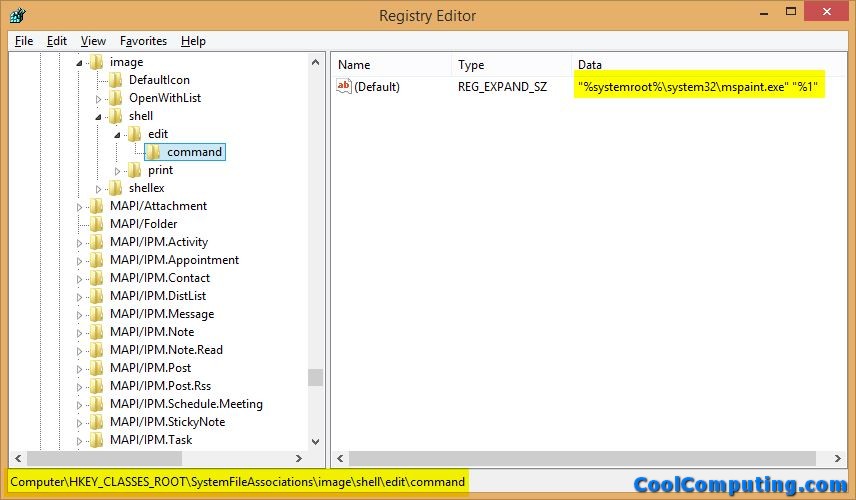
- Double click on "(Default)" on the right side of the window, and change the contents from:
"%systemroot%\system32\mspaint.exe" "%1"
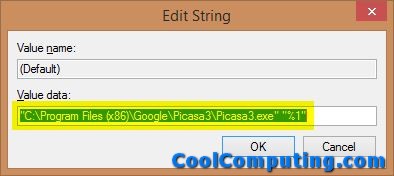
to:
"C:\Program Files (x86)\Google\Picasa3\Picasa3.exe" "%1"
If you prefer a different program, you can always put that in here at this point as well.
- Close the Registry Editor, and now test things out by bringing up the Context Menu with a right-click on a pic and pick Edit, and voila, the image is now loaded in the Picasa Editor (not the viewer). Note that if you have a lot of pictures inside the folder where the file is located, you might have to wait a bit for the program to scan through all of the pictures.
Even though I have Adobe Photoshop Elements 13 (PSE), I still prefer to use the excellent (and free) Picasa software most of the time because of its speed and ease of use. PSE has more features, but sometimes I just want to do a quick modification of a photo, so implementing this change has helped speed up my workflow. I hope it has too for those of you looking to quickly right-click on an image file in Windows Explorer, pick Edit, and quickly bring the photo up in Picasa (or any other software you like).