Red Pocket Port Out Account Number & Pin
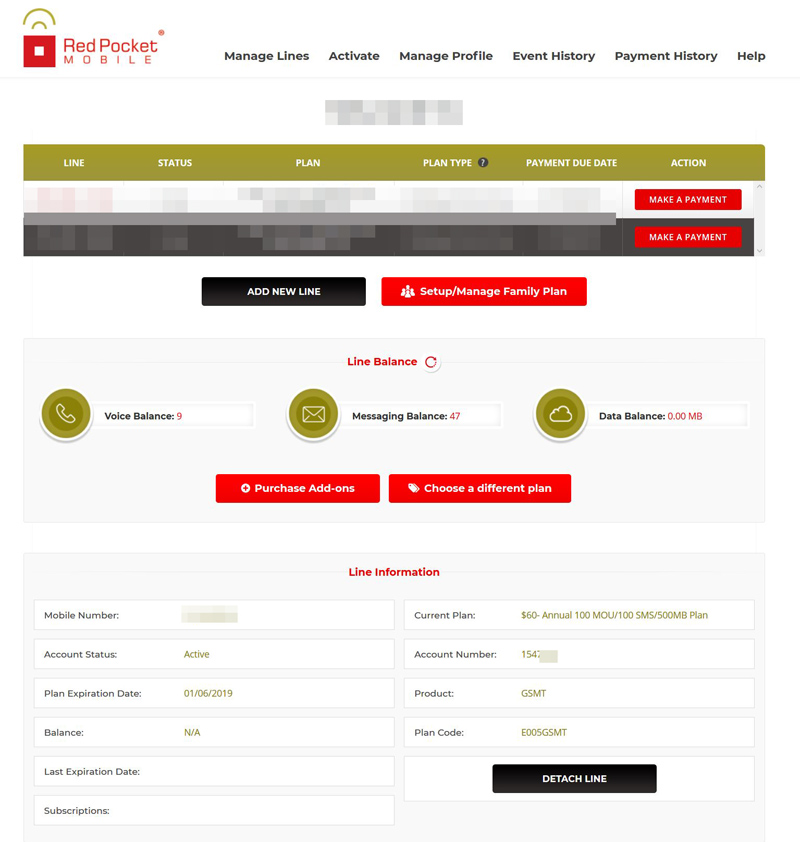
Apparently, that is NOT the account number to use. You have to use your phone number which is the account number. Reading online I also heard that the PIN number is the last 4 digits of the phone number, but that didn't work for me. I got the following from Speedtalk port support:
Hello,
Please contact your carrier and ask them to provide you with the correct account # and pin# so we may update the port accordingly.
RESOLUTION REQUIRED : INTRA, Password/PIN required or incorrect
So I went and chat with Red Pocket Support (which I was trying to prevent since it is usually a 30 minute wait)- apparently the code is the last 4 digits of the ICCID of your Red Pocket SIM card. That is also the authentication they use to authorize you when you chat online or speak with support on the phone.
So after fixing that error with the PIN number, the port went through within a few hours. Hope this helps anyone porting out of Red Pocket. Incidentally I was porting out this line because the user needed more data. Sometimes the data connection would stop working even though when I log into the account it would show for instance 163MB left of 500MB. Then a few days later it would finally show 0 MB left- seems that the info is being updated much too late. That is problematic because if you're planning ahead and you think you have X amount of data left, and all of a sudden you are out because what it was showing to you as data available was incorrect. Not sure if that is Red Pocket's or T-Mobile's fault, but it's certainly an issue they need to fix.
Hope this helps those of you looking to port out of Red Pocket some time by removing the need to contact their CS to get the account # and pin code.